Assessment technology for Australian RTOs

Every assessment, read properly.
Every judgement, still yours.

Apollo reads each learner’s work against your marking guide and drafts the marks.

01 / Assessment marking

Most of a marking hour is spent looking things up.

Re-reading the guide, finding the right paragraph. Apollo does that part, then stops.

Read against your unit

Student evidence. Your requirements. Your marking guide.

Load your marking guide and sample answers, and check each task’s setup. Apollo works out what kind of task it is.

A first pass is laid out

A drafted tick or cross for each requirement.

Apollo’s first marking pass: drafted ticks and crosses on a student’s work. Question 3 is marked wrong, with a note only the assessor sees and feedback for the learner that responds to their own answer. Demo data, fictional RTO.
A real draft judgement · demo data · the assessor decides
Assessor review

Your assessor confirms, changes or overrules. Then signs.

Apollo can’t finalise a result on its own. The returned document shows the assessor’s name and when they signed.

Confirm Change Overrule
Whole document · not question fields
Feedback that quotes the work
Not automated
02 / Batch marking

One learner, or the whole cohort at once.

Word, Excel, PDF or scans, just as learners handed them in. No retyping.

One guide for the whole batch.

Large batches are normal, and that’s where most of the time is saved. Once each task’s guide is checked, every assessor marks against it.

Submissions in batch
1
03 / Integrity check

Every submission, compared with every other.

Every answer is compared with every other, and with the sample answer, on your own computer. Most comparisons find nothing.

Flagged for review

A comparison no one could do by hand across a whole cohort.

Apollo shows where answers look unusually alike. It doesn’t search the internet or past classes. An AI second look is optional, with names removed first.

Submission 18
Submission 41 · high similarity
04 / Assessment insights

Individual results become unit-level insight.

Apollo keeps the patterns, not the learners’ work.

Apollo shows where to look. People work out why.

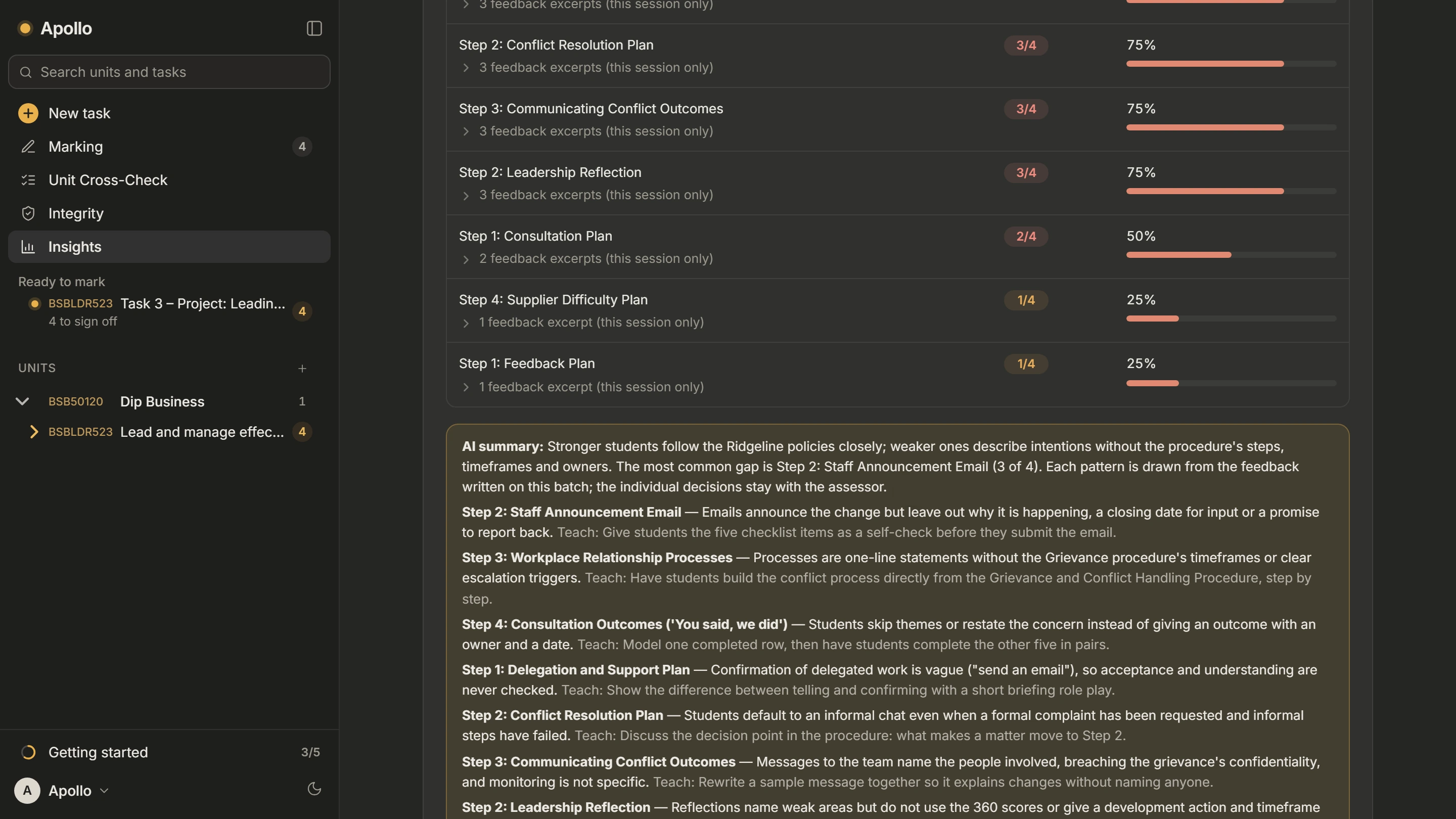
Hard tasks, common mistakes and possible problems with the assessment, shown by task and question.

Task 2.3
38% initial unsatisfactory
Illustrative example
Question 7
Recurring difficulty
Unit BSBOPS504
Competency gap emerging
Cohort trend
Improving
Apollo's Insights screen: for one task, each step shows how many learners fell short (Step 2: 3 of 4, 75%), followed by an AI summary of the common gaps with a teaching suggestion for each. Demo data from a fictional RTO.
The real Insights screen · demo data, fictional RTO
05 / Unit Cross-Check
Unit requirements
Assessment tasks
Marking guide
Task instructions
Sample answers
Templates
Mapping

A unit is a set of documents that have to agree with each other.

Apollo reads your unit’s documents side by side, like an auditor would, before validation.

Potential issue

Performance criterion 2.2: no clear assessment evidence.

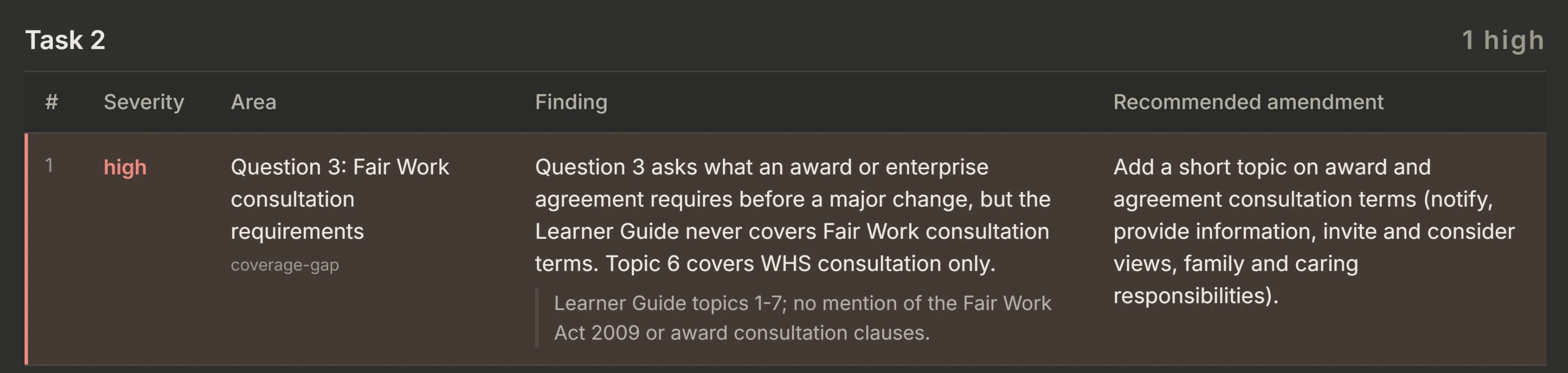
If a task asks for something the guide never checks, Apollo shows you where.

Recommended action
A real Unit Cross-Check finding in Apollo: Task 2, high severity. Question 3 asks about Fair Work consultation terms, but the Learner Guide never covers them. Recommended amendment: add a short topic on award and agreement consultation terms. Demo data, fictional RTO.
The real Cross-Check report · demo data, fictional RTO · an assessor decides what to act on

Apollo gives your validators a clear list to review. It doesn’t do the validation.

06 / Continuous improvement
Assess
Understand
Review
Improve
Measure
Assess again

Marking feeds insight. Insight points to the unit. The unit gets better.

Marking shows a pattern. The Cross-Check finds the cause. You fix the task. The next class shows if it worked.

07 / Where it fits

Keep the systems that run your RTO.
Improve what happens around assessment.

Your SMS, LMS and templates stay as they are. Apollo takes your files and gives back marked work.

Stays as isLMS · SMS · enrolment · certification · AVETMISS reporting
ApolloMarking · integrity check · insights · Unit Cross-Check
To adoptEach assessor signs in from a browser. Nothing to move over.
To stopCancel any time. There’s no learner work to take back.
07b / The round trip
Export from your SMS / LMS
Apollo · read, drafted, checked
Back, marked and signed
Out

Exported as usual.

Through

Read, drafted and checked by a person.

Back

Returned marked and signed. Your records never moved.

08 / The software

One screen. Drop the batch, review the marks, sign off.

Runs in your browser at my.apolloedu.au. Nothing to install.

01 Drop the batch02 Choose the unit03 Review the first pass04 Sign
Batch

The whole class at once, as handed in.

Integrity check

Answers compared with each other and the sample answer, on your computer.

Unit Cross-Check

Your unit’s documents checked against each other.

Returned document

Ticks, crosses, feedback, and the assessor’s name and sign-off time.

08b / One batch, timed
By hand · 6.5 hours (trainer estimate)
With Apollo · 2 hours (timed)
The batch

24 assessments. One trainer. Same unit, same guide.

Marked by hand

Six and a half hours, by her estimate.

Marked with Apollo

Two hours, timed by her. Every judgement still hers.

09 / Testimonials

One trainer timed one real batch. Estimates and extrapolations are labelled.

0.0hrs
to mark 24 assessments with Apollo. The same trainer estimated 6.5 hours by hand.
0min
per assessment with Apollo, timed by the trainer, against her estimate of 16.25 minutes by hand.
0hrs
of assessor time returned per 1,000 assessments, extrapolated from one trainer’s batch at 11.25 minutes saved each.
0
assessments in the timed batch.

Not yet proven: marking quality hasn’t been independently checked, and this is one trainer and one batch. She timed the 2 hours; the 6.5 hours is her estimate. Your results will differ.

In their own words
“On average, I can now complete Knowledge Questions in around 5 minutes instead of 15, and Task 3 assessments in around 15 minutes instead of 40+min, including marking, providing feedback in Moodle and uploading the marked assessment.”
Trainer · Queensland RTO
“I see the app as a tool to support the trainer’s professional judgement rather than replace it.”
Trainer & Assessor · Queensland RTO
Read the full testimonials Where the figures come from
Then it leaves

After sign-off, the batch is gone. Learner submissions are never stored: they’re held in your browser and cleared when you reload or sign out.

10 / Your data and your judgement

Learner work is never stored by Apollo.

Apollo keeps your account, a usage record (no content), your marking counts and, if you choose, your saved guides and templates. Learner work stays in your browser and is cleared when you reload or sign out.

Assessor's machine
Submissions held in memory while the batch is open.
Names, IDs, emails and phone numbers removed automatically here (check the preview), and blacked out of scans where they can be read.
What is sent
Assessment text and page images, with names removed, plus your marking guide.
Sent to Anthropic, outside Australia. Their terms say it isn’t used to train their AI by default.
Returned document
Marked up, with the assessor's name and time of sign-off.
Goes back to your SMS or LMS the way it came out.
After sign-off
No learner work is stored. No submissions database, on your machine or ours.
Insights keep the pattern, not the student work.
The assessor decides

Under the Standards, your assessor decides competence. Apollo is built so that it can’t. It drafts; the assessor sets the outcome and signs off each assessment.

The one limit worth stating

Identifiers can't be reliably removed from handwriting, because text recognition can miss them. So Apollo holds images back until the assessor has checked and confirmed them.

Before adopting

Your RTO should satisfy itself as to Australian Privacy Principle 8, as it would for any offshore processor. Written up for your compliance officer →

11 / Go deeper

The rest is written down, page by page.

For trainers
The marking still gets done. It just stops taking your evenings.
Read →
For RTOs
Same assessors. Marking turned around faster, and every learner marked against the same guide.
Read →
Pricing
$139 a month for a trainer. A customised quote for an RTO. AI processing included in both.
View pricing →
Your data
What is sent, what isn’t, and where processing happens. Written for your compliance officer.
Read →
Why Apollo
How it compares to the platform you already run, and what it deliberately is not.
Compare honestly →
Blog
Why we built Apollo. Why we call it a VET Education Co-Pilot. Tools, not platforms.
All posts →

Better marking.
Better assessment.
Better decisions.

Run one unit through Apollo and measure your own turnaround and hours against last term.

Do you run an RTO?